Field count checks
Confirm each authorization line has the expected domain, seller ID, DIRECT or RESELLER value and optional certification authority ID.
Free Ads.txt and App-ads.txt Checker
Ads.txt content is checked locally in your browser. No ad account login is required. Use the Ads.txt and App-ads.txt Checker to review ads.txt, app-ads.txt and authorized sellers file content for field count, advertising system domains, publisher or seller IDs, DIRECT or RESELLER values, certification authority IDs, duplicate records, comments, blank lines, case issues and common text mistakes.
Browser-local authorized sellers file check
This page combines Ads.txt Checker, App-ads.txt Checker and Authorized Sellers File Checker workflows in one local text parser.
Your authorized sellers file stays in this browser tab. This local checker does not verify whether seller IDs are real, check ad network account validity, diagnose Google AdSense or AdMob revenue, or query external ad databases.
Authorized sellers file results will appear here
Paste ads.txt or app-ads.txt content to check local format issues, duplicate authorized seller records, DIRECT and RESELLER distribution, missing fields, malformed domains, case cleanup and a copyable cleaned version.
File type judgment
Valid authorization lines
Invalid line numbers
Duplicate authorization records
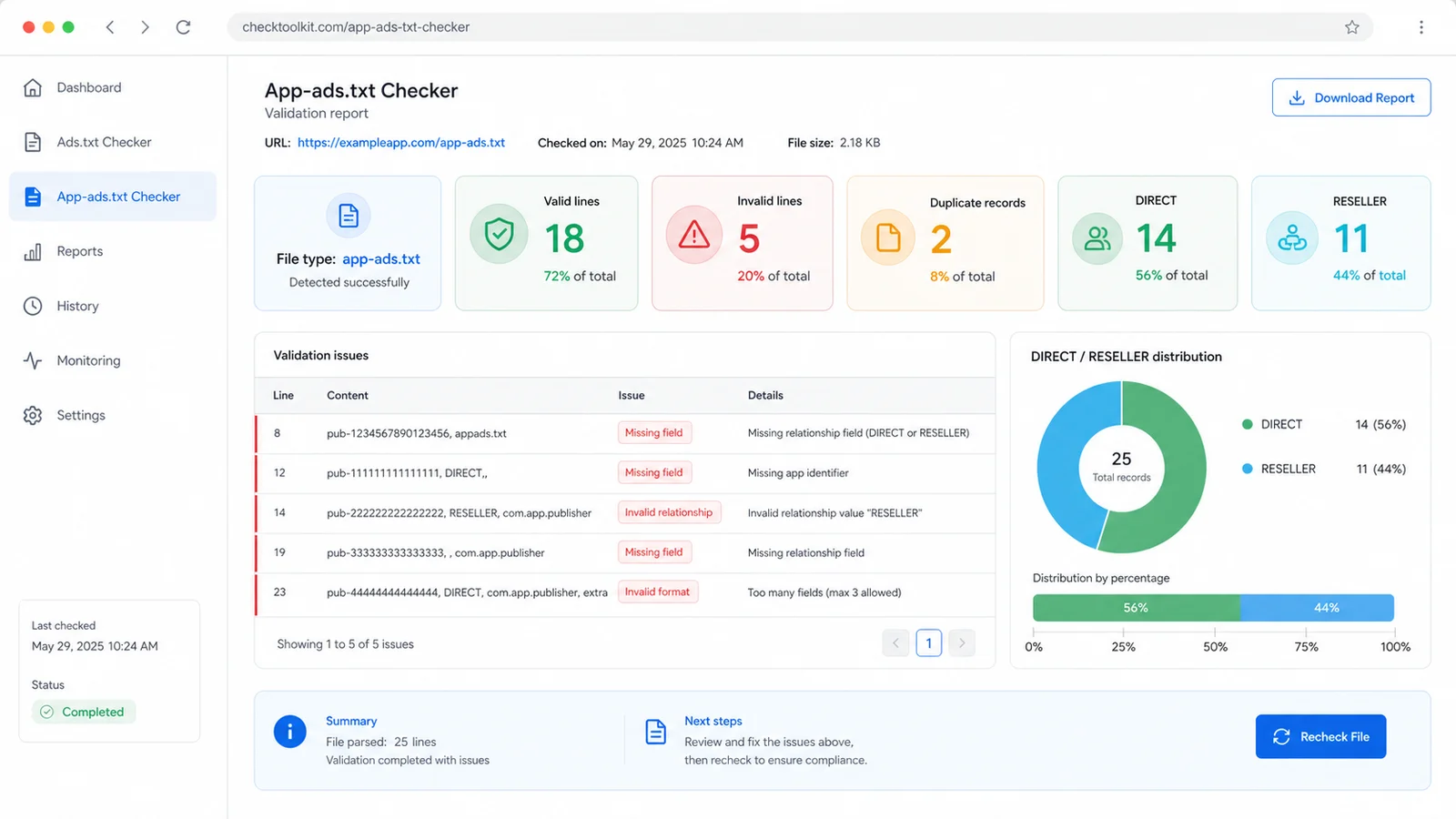
DIRECT / RESELLER distribution
Cleanup status
The checker focuses on local text format checks. It does not validate seller ID ownership, ad account health, platform revenue or external database truth.
Paste ads.txt or app-ads.txt content and the local parser separates comments, blank lines, directives and authorization records inside your browser.
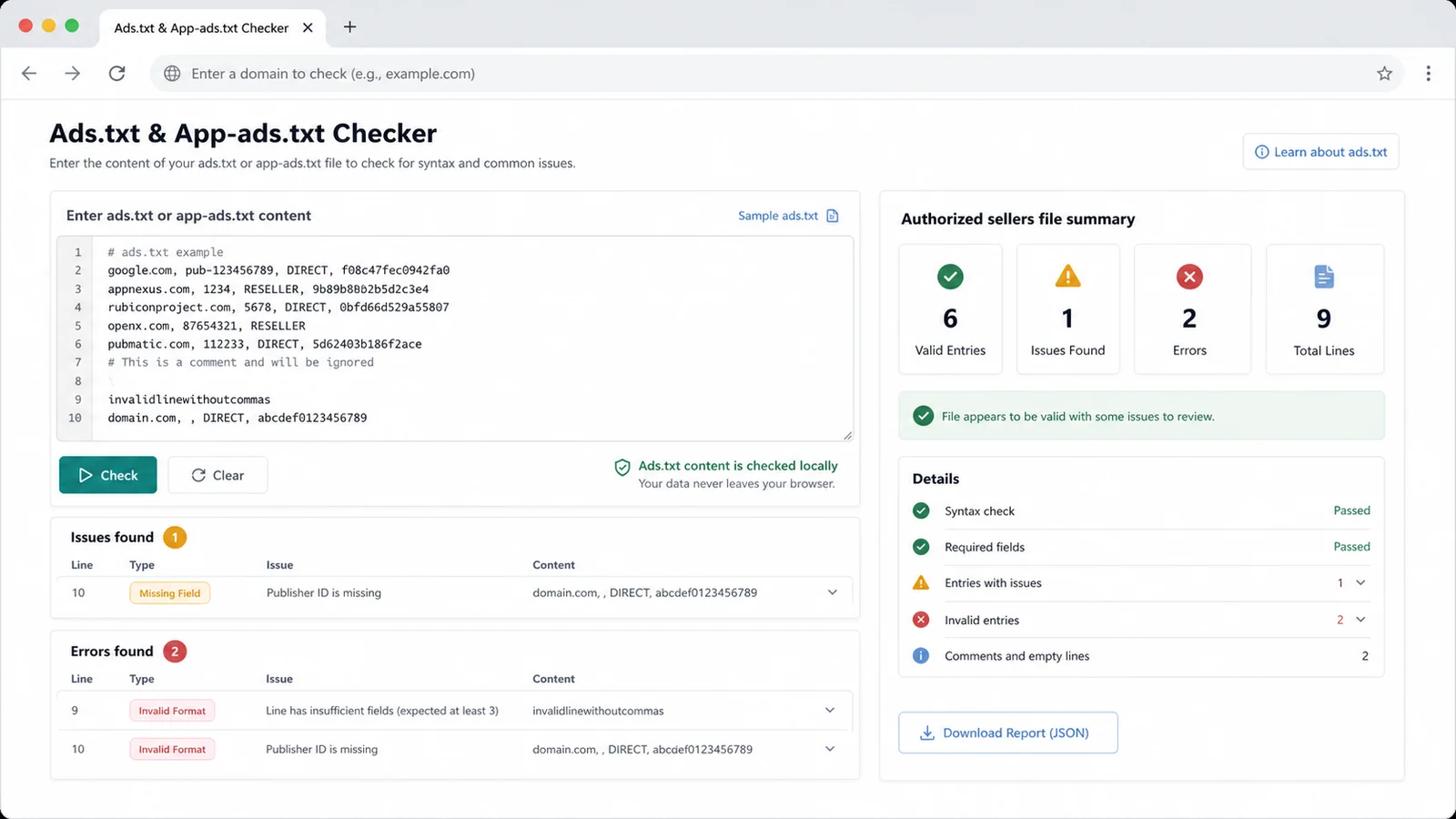
The result view shows file type judgment, valid line count, invalid line numbers, duplicate records, DIRECT and RESELLER distribution, missing fields and format errors.
After the tool lists the main issues, copy the suggested cleaned content, confirm partner-provided IDs yourself and recheck before publishing.
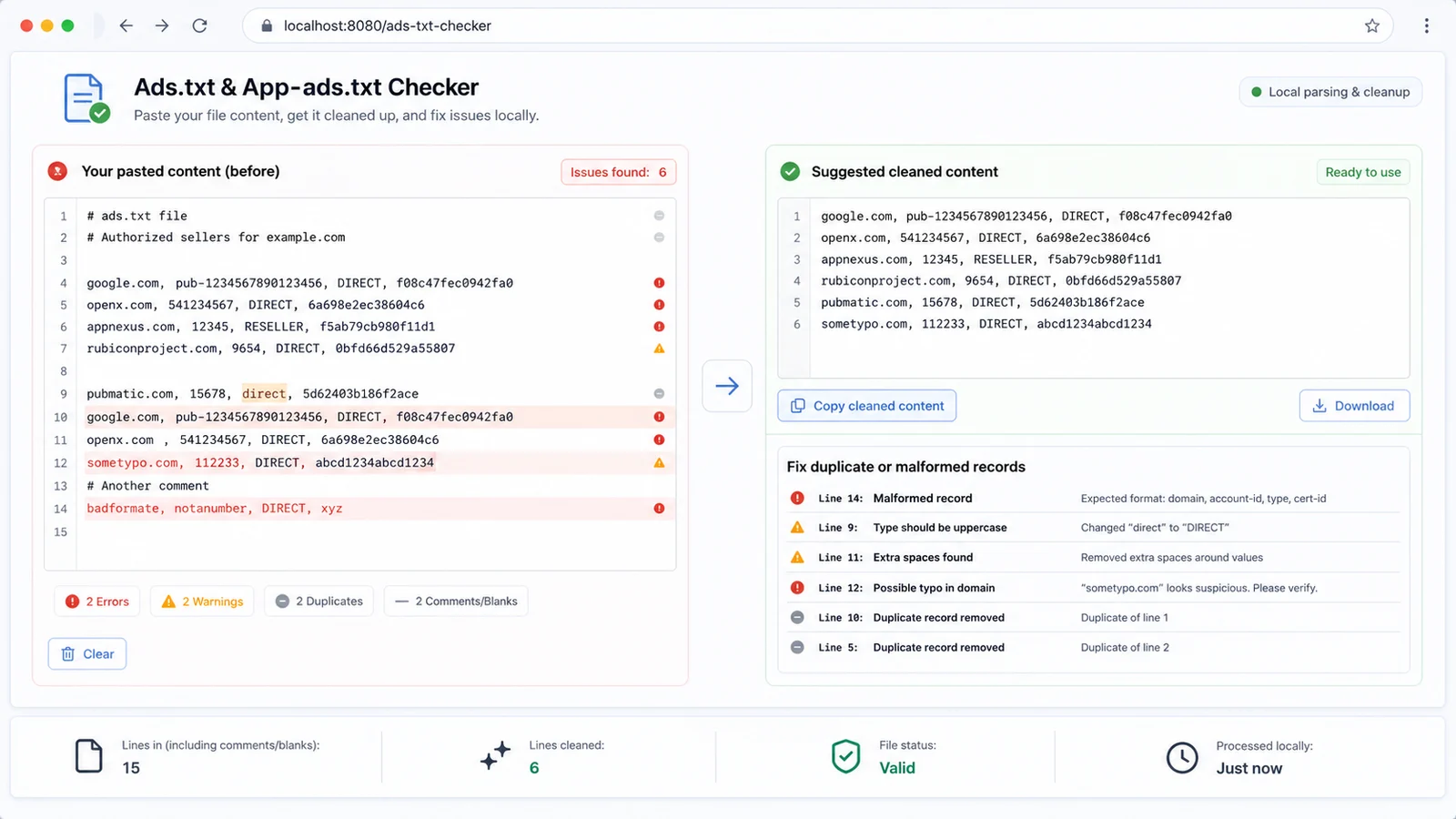
Use this local parser when one authorized sellers file needs practical format review before you publish or send it to an ad operations team.
Confirm each authorization line has the expected domain, seller ID, DIRECT or RESELLER value and optional certification authority ID.
Spot malformed advertising system domains, protocol or path mistakes, placeholder seller IDs and obvious domain typos.
See DIRECT and RESELLER counts while the checker normalizes relationship case and flags invalid relationship values.
Find repeated normalized seller records so the final authorized sellers file stays shorter and easier to audit.
Ignore full-line comments and blank lines while still warning about inline comments that may be worth cleaning.
Copy a normalized version with lowercase domains, uppercase DIRECT or RESELLER values, supported directives and duplicates removed.
This paste-in browser tool runs text format checks only, so it is useful before a live crawl or partner review.
Use the exact ads.txt or app-ads.txt content you plan to publish. The local parser reads comments, blank lines, directives and comma-separated authorization records locally.
Start with file type judgment, valid line count, invalid line numbers, duplicate authorization records, DIRECT and RESELLER distribution, missing fields, format errors, main issues and repair suggestions.
This is not an ad platform account check. The checker does not confirm whether a seller ID is real, active, approved or connected to revenue.
Review reportCopy the suggested cleaned content, then compare seller IDs and domains with your SSP, exchange or ad network instructions before you publish the final file.
Keep partner-provided lines as the source of truth when the local checker flags a spelling or case concern.
Recheck contentAnswers about local privacy, accepted files, ads.txt and app-ads.txt format, DIRECT or RESELLER interpretation, duplicate records and tool boundaries.
It validates local text format: comma-separated field count, advertising system domain shape, publisher or seller ID presence, DIRECT or RESELLER values, optional certification authority ID, duplicate records, comments, blank lines, case issues and obvious text mistakes.
No. It does not verify whether a seller ID is real, active, approved, owned by your company or accepted by a specific advertising platform. Confirm IDs with the SSP, exchange or ad network that issued them.
Yes. This page intentionally combines Ads.txt Checker, App-ads.txt Checker and Authorized Sellers File Checker tasks because the core authorization record format is shared. App-specific directives are reviewed as local text, not by crawling app stores.
No. It does not log in to Google AdSense, Google AdMob or third-party ad platforms, and it does not diagnose revenue, fill rate, approval status, bidding eligibility or account policy issues.
No. The checker does not query external ad databases because those datasets change frequently and can be platform-specific. It only checks the pasted text in your browser.
Fix clear syntax problems first, such as missing fields, extra commas, invalid domains or relationship typos. For seller IDs, certification IDs and partner domains, compare against the exact line supplied by your advertising partner before publishing.
Paste the final authorized sellers file, fix local format failures, review cleanup suggestions, and then confirm real partner IDs with your ad operations source of truth.
This is a local text format checker, not an official ad platform approval or seller identity verification service.