Cron Expression Checker field count validation
The Cron Expression Checker expects exactly 5 fields and helps you remove command text, seconds or year fields before they create platform confusion.
Browser-side 5-field cron validator
Paste a 5-field cron schedule into this Cron Expression Checker before you configure backups, publishing, scraping, email jobs, server tasks or GitHub Actions workflows. The local report checks field count, minute, hour, day, month and weekday ranges, step values, field meaning, common misunderstandings and the next 5 run times in your browser.
Local Cron Expression Checker
Use the Cron Expression Checker for minute hour day month weekday expressions before a task reaches production. It checks syntax locally, explains each field, flags risky combinations and calculates upcoming runs in this browser.
First version supports 5 fields: minute hour day month weekday. It accepts *, lists, ranges, steps, month names and weekday names.
Your cron expression stays in this browser tab. This checker does not upload schedules.
Cron Expression Checker results will appear here
Enter a 5-field cron expression to see validity, field explanations, out-of-range values, step errors, misunderstanding warnings and the next 5 run times.
The Cron Expression Checker turns a pasted 5-field cron expression into a local report with validity, field meaning, warnings and upcoming run times.
Enter minute hour day month weekday fields, then let the Cron Expression Checker confirm field count, ranges, lists, ranges and step values.
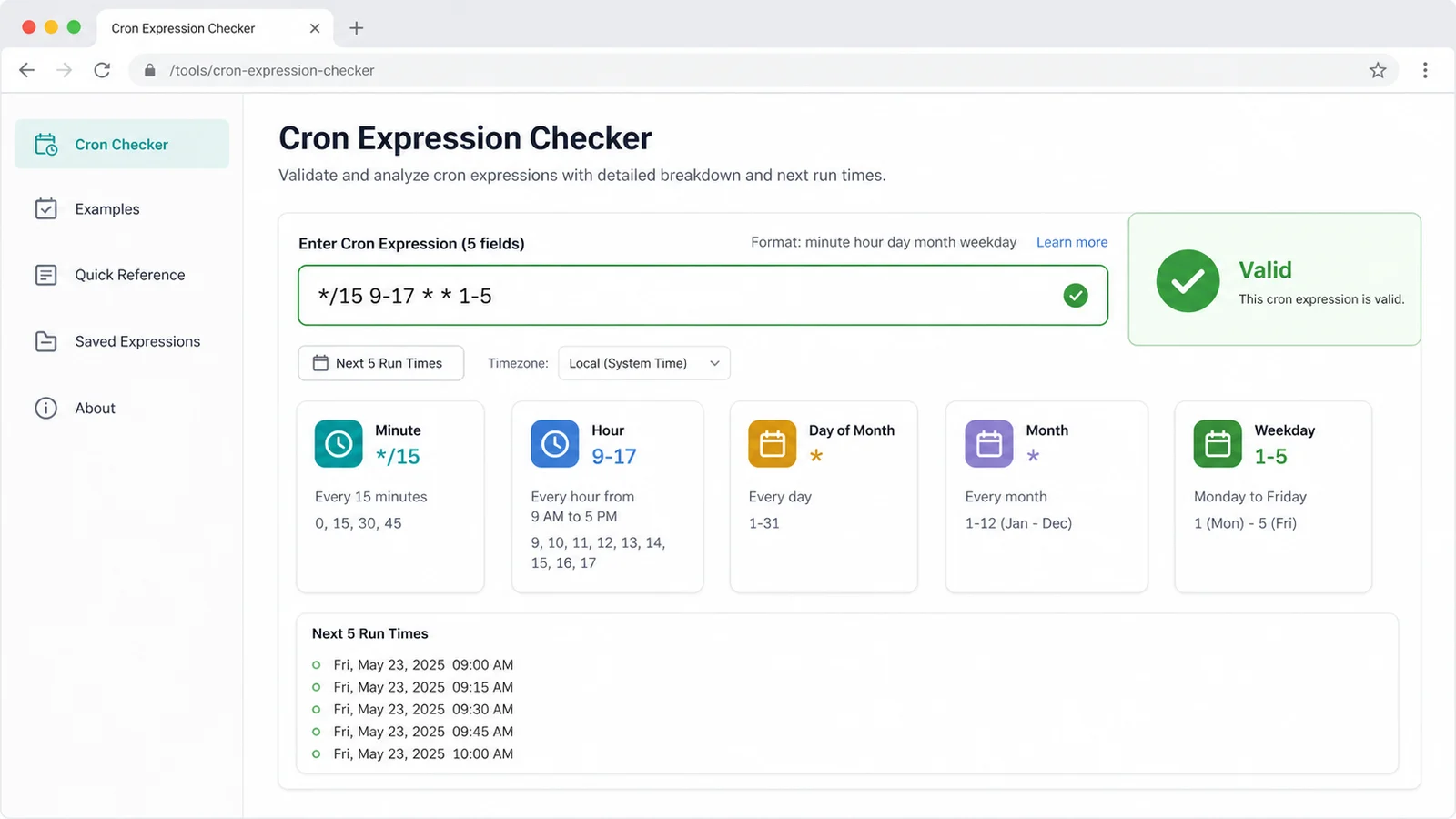
Use the Cron Expression Checker to see what each minute, hour, day, month and weekday field means before you paste it into a server or workflow file.
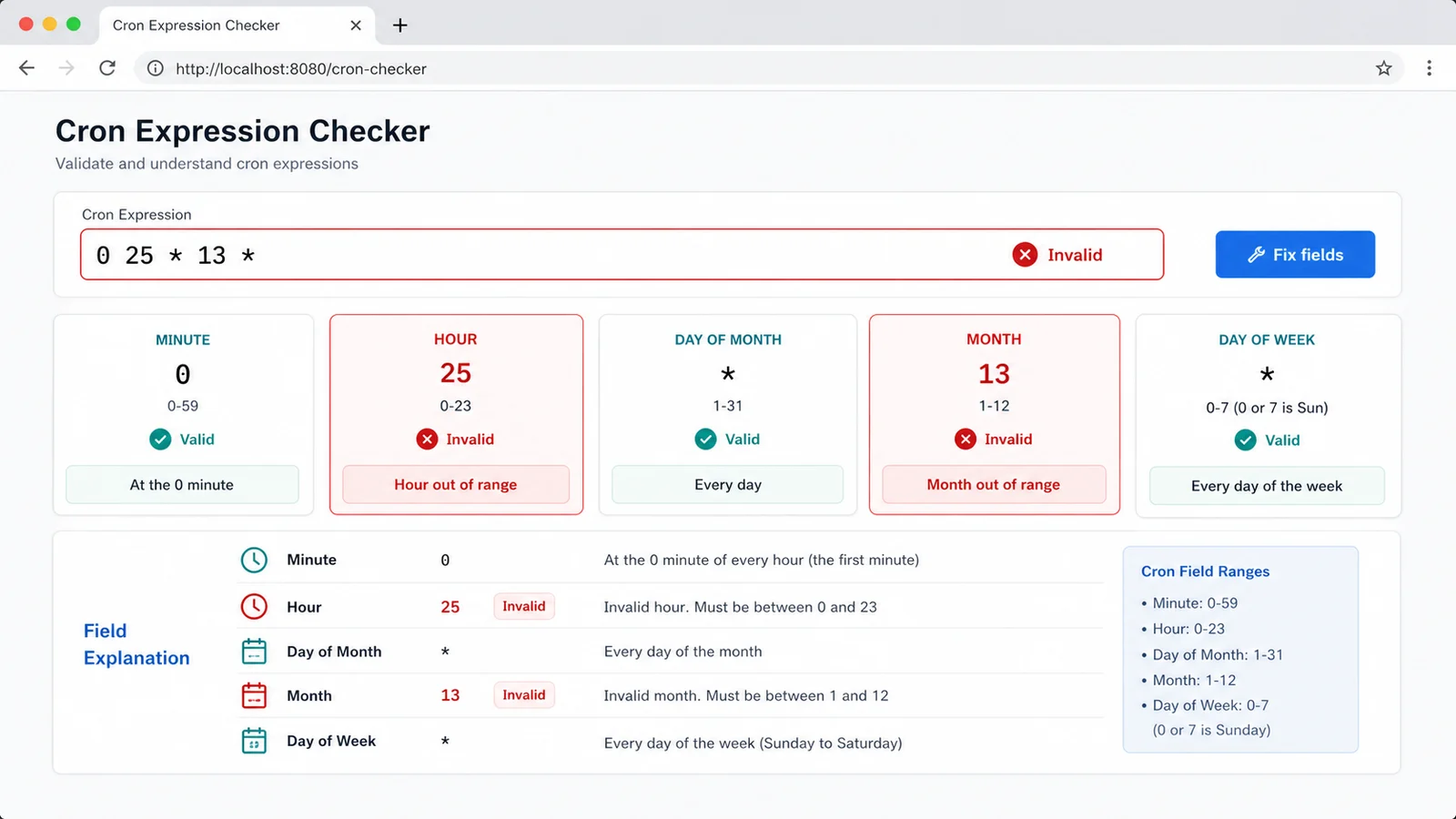
The Cron Expression Checker calculates the next 5 run times locally and warns about day-versus-weekday matching, overly frequent jobs and timezone assumptions.
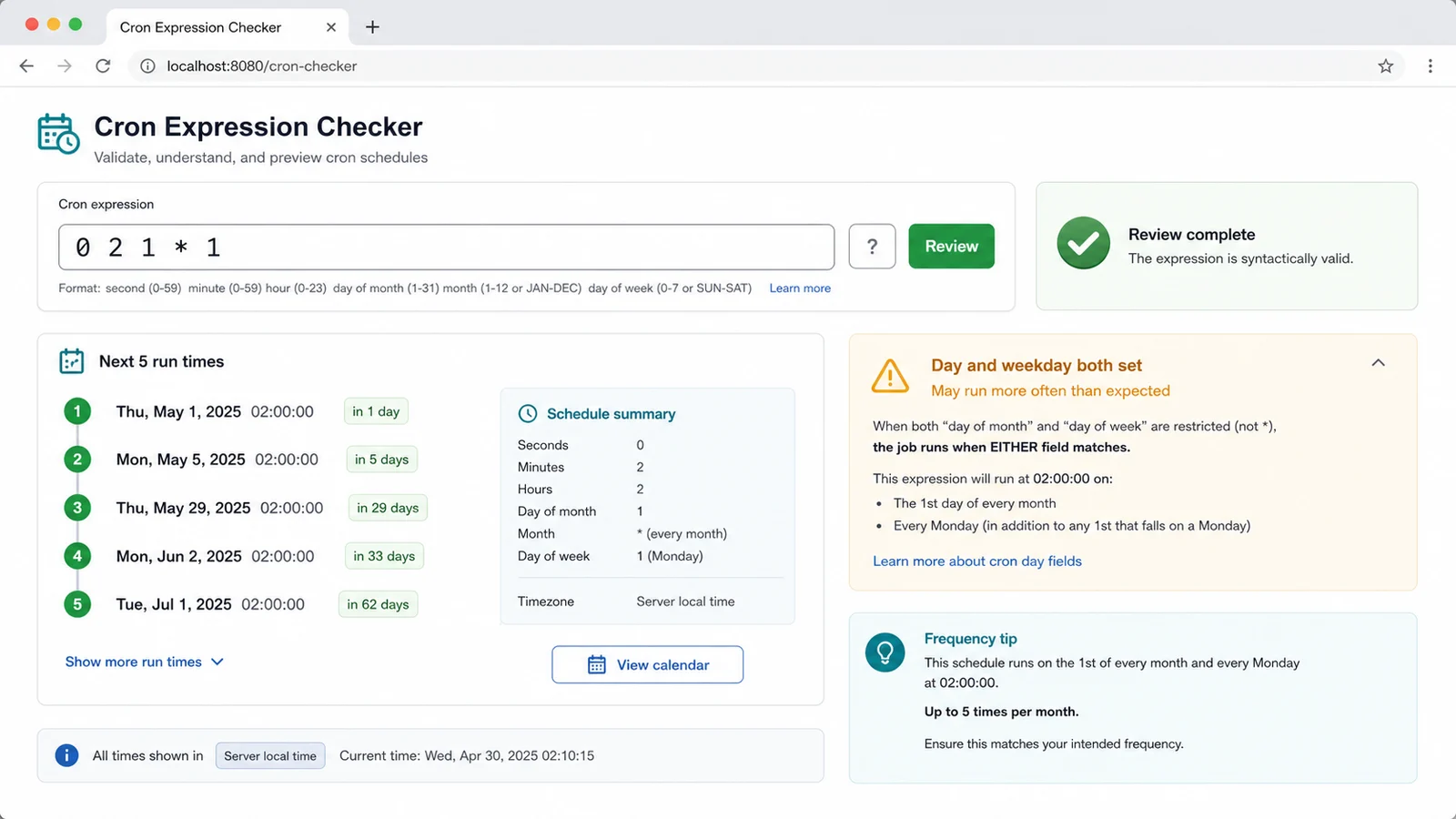
Use the Cron Expression Checker when a schedule controls a release, backup, crawler, email, maintenance task or GitHub Actions workflow.
The Cron Expression Checker expects exactly 5 fields and helps you remove command text, seconds or year fields before they create platform confusion.
The Cron Expression Checker checks minute 0-59, hour 0-23, day 1-31, month 1-12 and weekday 0-7 values before a job runs.
Use the Cron Expression Checker to catch bad step syntax such as zero steps, malformed slashes or steps attached to a single value.
The Cron Expression Checker previews the next 5 local run times so you can compare the schedule against the moment you actually expect.
The Cron Expression Checker warns when day-of-month and weekday are both set, when no future date appears, or when the job may run too often.
The Cron Expression Checker runs in your browser and does not need a database or network request to inspect your automation schedule.
This Cron Expression Checker is a practical preflight for developers, site owners, automation users and server operators who need a schedule to run at the intended time.
Start with the 5 fields you plan to use: minute hour day month weekday. Leave out the command, seconds field or year field so the Cron Expression Checker can focus on standard 5-field cron.
Read the minute, hour, day, month and weekday explanations. The Cron Expression Checker makes range, list and step behavior visible before the schedule controls a backup, crawler or email job.
Pay special attention to hour and month ranges, because values such as 25 or 13 are common copy mistakes.
Review fieldsUse the next 5 run times and warnings to confirm the job is not too frequent, not missing expected dates and not relying on a timezone different from the target platform.
Answers about 5-field cron syntax, local calculation, platform differences, privacy and how to read warnings.
This first version focuses on 5-field cron: minute hour day month weekday. It supports *, comma lists, ranges, steps, numeric values and common month or weekday names. It does not try to cover every seconds-field, year-field or vendor-specific extension.
No. The expression is parsed and the next run times are calculated in your browser tab. The Cron Expression Checker does not need a database or server-side lookup.
In many POSIX-style cron implementations, a job can run when either day-of-month or weekday matches. That means 0 2 1 * 1 may run on the first day of the month and also on Mondays, which is broader than many users expect.
No. The Cron Expression Checker calculates future times locally as a preflight. GitHub Actions schedules run in UTC or the configured timezone, and servers may use their own timezone, cron daemon and daylight-saving behavior.
Fix the value to fit the allowed range: minute 0-59, hour 0-23, day 1-31, month 1-12 and weekday 0-7 where 0 and 7 mean Sunday. Then rerun the Cron Expression Checker and compare the next run times.
No. It helps catch schedule mistakes before launch, but important backups, publishing jobs, scrapers and email tasks still need platform-specific testing, logs, alerts and monitoring.
Paste a 5-field cron expression before setting up automatic publishing, backups, scraping, email delivery, server maintenance or GitHub Actions.
Check validity, field meaning, next run times and common cron misunderstandings locally, then copy the report for your deployment notes.
Local 5-field cron checks in your browser.