Record type statistics
Count A, AAAA, CNAME, MX, TXT, NS, SOA and CAA records so you can quickly spot missing or unexpected groups.
Local DNS zone file and record text checker
Paste a DNS zone file, Cloudflare DNS export or bulk DNS records into this DNS Zone File Checker before a migration. DNS zone files are checked locally in your browser. They are not uploaded. The page checks record syntax and migration risks; it does not run live DNS propagation, global node monitoring or DNS history lookups.
DNS Zone File Checker local-only review
Use the DNS Zone File Checker for BIND-style zone files, Cloudflare DNS exports and pasted DNS record batches. It checks A, AAAA, CNAME, MX, TXT, NS, SOA and CAA records in the browser and highlights problems that often break DNS migrations.
DNS zone files are checked locally in your browser. They are not uploaded.
This DNS Zone File Checker does not perform real-time DNS propagation checks, global node tests or DNS history queries because those require multi-region servers, external databases or continuous crawling.
DNS Zone File Checker results will appear here
Paste records to see record type statistics, invalid lines, CNAME conflicts, MX priority gaps, TXT quote issues, duplicate SPF, wrong DMARC and DKIM hostnames, abnormal TTLs, wildcard risk, root @ notation, trailing-dot issues and copyable repair suggestions.
The DNS Zone File Checker turns pasted DNS record text into grouped findings before you import records or change nameservers.
Paste a BIND zone file, Cloudflare DNS export or bulk DNS records and keep the entire review inside your browser.
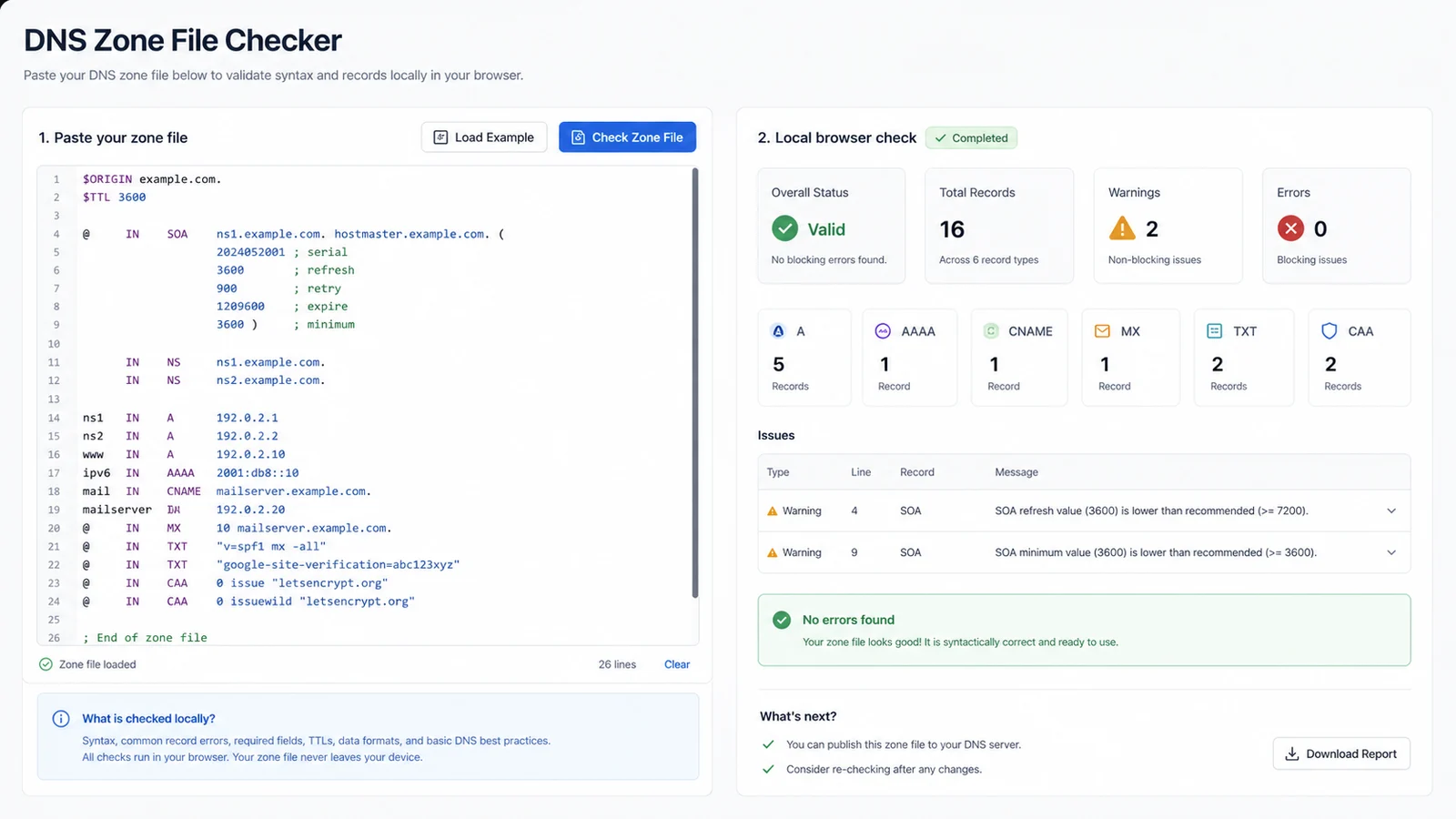
See invalid lines, CNAME conflicts, missing MX priority, TXT quotes, duplicate SPF, DMARC and DKIM hostnames, TTLs, wildcards and trailing dots.
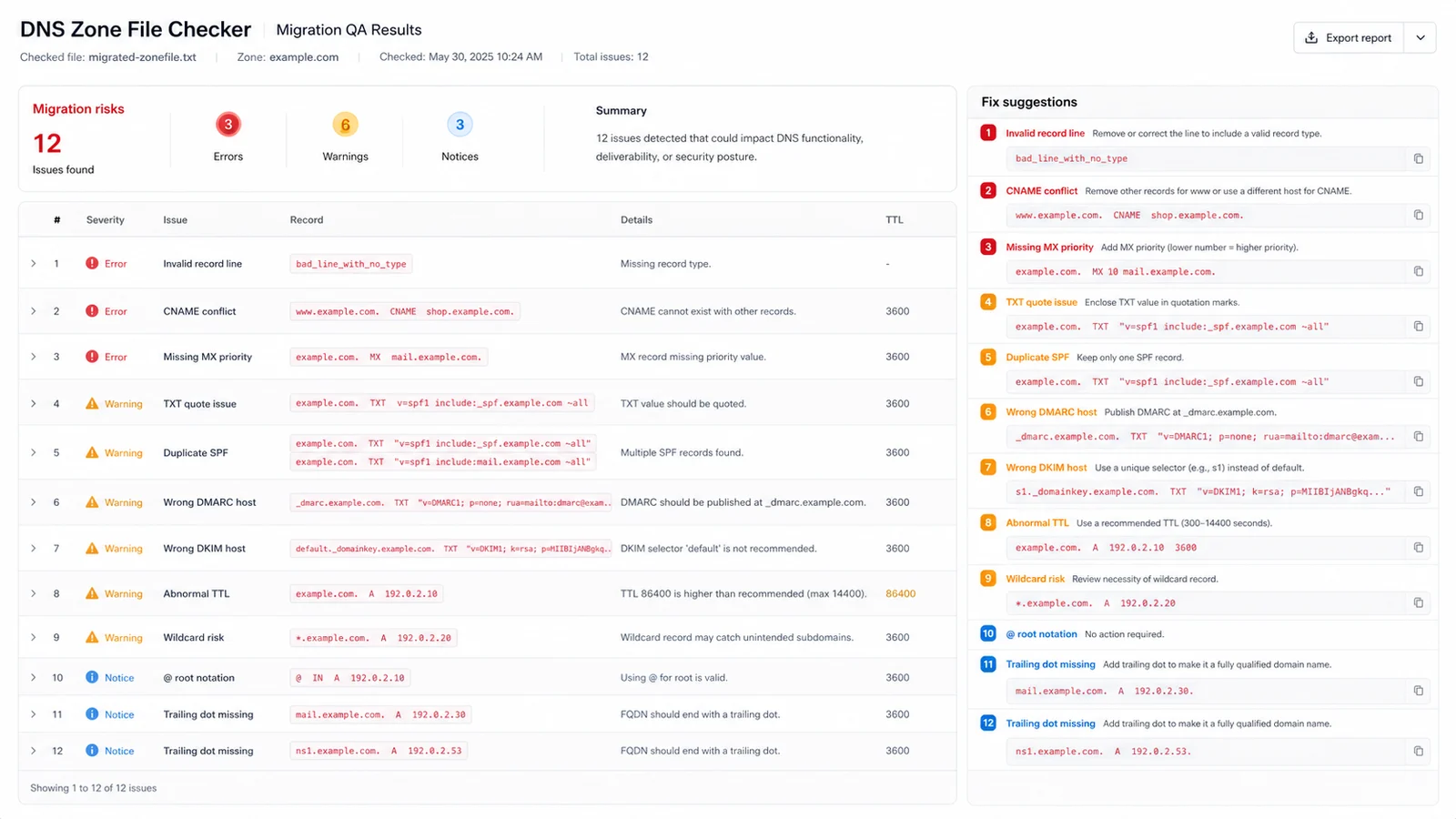
Use copyable suggestions as a migration checklist while remembering that live propagation, global nodes and DNS history are outside the local scope.
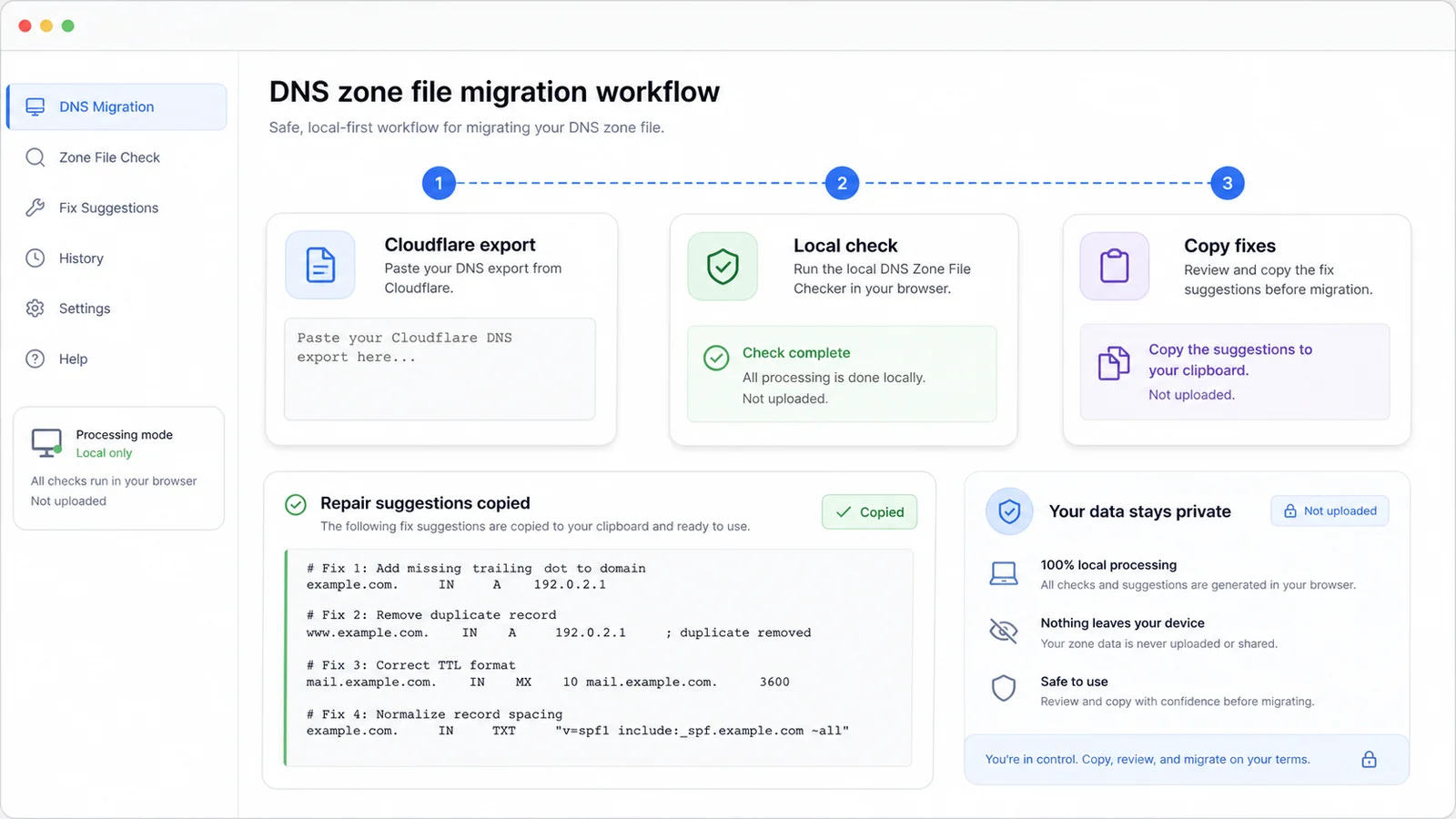
This DNS Zone File Checker focuses on browser-local parsing and practical migration risks, not network-dependent DNS intelligence.
Count A, AAAA, CNAME, MX, TXT, NS, SOA and CAA records so you can quickly spot missing or unexpected groups.
Find invalid lines, CNAME coexistence conflicts, missing MX priority, malformed A or AAAA values and incomplete SOA or CAA rows.
Catch duplicate SPF TXT records, DMARC records outside _dmarc and DKIM TXT records outside selector._domainkey before import.
Flag unusually low or high TTL values and wildcard records that could catch unintended hosts after a migration.
Highlight root @ notation and missing trailing dots so records are easier to move between DNS providers.
Keep the DNS Zone File Checker focused on pasted text and avoid data-heavy propagation, node or history claims.
Use the DNS Zone File Checker before importing DNS records into a new provider, changing nameservers or cleaning up a Cloudflare export.
Paste a DNS zone file, Cloudflare DNS export or DNS record batch. Include $ORIGIN and $TTL when available so @, relative names and TTL review are clearer.
Start with invalid record lines, CNAME conflicts, MX priority, duplicate SPF and wrong DMARC or DKIM hostnames. Then review TXT quotes, TTL, wildcard, @ and trailing-dot items.
The DNS Zone File Checker is a migration QA helper. It checks pasted text, not the live public DNS state.
Review findingsCopy the fix list into your change plan, adjust records in your DNS provider and run the DNS Zone File Checker again before import or cutover.
Answers about DNS Zone File Checker privacy, accepted input, local accuracy, migration limits and what to do with failed checks.
No. DNS zone files are checked locally in your browser. They are not uploaded. The page parses the pasted text and creates findings in the frontend.
You can paste BIND-style DNS zone files, Cloudflare DNS exports and bulk DNS record text. The checker looks for A, AAAA, CNAME, MX, TXT, NS, SOA and CAA records plus common $ORIGIN and $TTL directives.
No. Real-time DNS propagation checks, global node detection and DNS history lookup need multi-region servers, external datasets or ongoing crawling. This tool only checks pasted DNS text locally.
The DNS Zone File Checker catches migration risks such as unquoted TXT values, duplicate SPF records, DMARC TXT records outside _dmarc and DKIM TXT records outside selector._domainkey. Provider-specific policy quality still needs manual review.
A missing trailing dot can make host targets relative to the zone origin during some imports. Relative names can be valid, but the warning helps you review MX, CNAME, NS and SOA targets before moving providers.
Fix high-risk items first: invalid lines, CNAME conflicts, missing MX priority, duplicate SPF and wrong DMARC or DKIM hostnames. Then copy the suggestions, update the source records and rerun the local check.
Run the DNS Zone File Checker before importing Cloudflare exports, changing nameservers or cleaning DNS records for a launch.
The check stays local in your browser and gives you grouped findings plus copyable repair suggestions.
Local DNS zone file and record text checks only. No propagation check, global node test or DNS history lookup.