Base64 and Base64URL detection
The tool recognizes common Base64 and Base64URL shapes, pads them safely for browser decoding and shows the decoded UTF-8 result.
Browser-side encoded text decoder
Encoded text is decoded locally in your browser. No external safety database is queried. Paste Base64, Base64URL, URL encoded text, HTML entities, Data URLs, copied mojibake, API response fragments or suspiciously unreadable text into this Encoded Text and Data URL Checker to identify likely encoding types, decode candidates, MIME type details, invisible characters, double encoding and privacy-risk patterns without uploading the input.
Local Encoded Text and Data URL Checker
Paste a single encoded fragment or copied data URI. The Encoded Text and Data URL Checker tries reversible local decodes, then shows the likely type, length changes, decoded preview, Data URL file type, invisible character warnings and privacy-risk hints.
Encoded text is decoded locally in your browser. The input is not uploaded, stored or sent to an external safety database.
This is not a malicious URL checker, phishing checker, virus checker, file reputation checker or external link safety score.
Local decoding results will appear here
Paste encoded text to identify likely Base64, Base64URL, URL encoding, HTML entities or Data URL content, then review decoded length, MIME type, invisible characters, double encoding and privacy-risk hints.
This page combines Base64 Checker, Base64URL Checker, URL Decode Checker, HTML Entity Decoder, Data URL Checker and Invisible Character Checker behavior in one browser-only page.
Start with Base64, Base64URL, URL encoded text, HTML entities, a Data URL or copied API response fragment instead of splitting the task across small decoders.
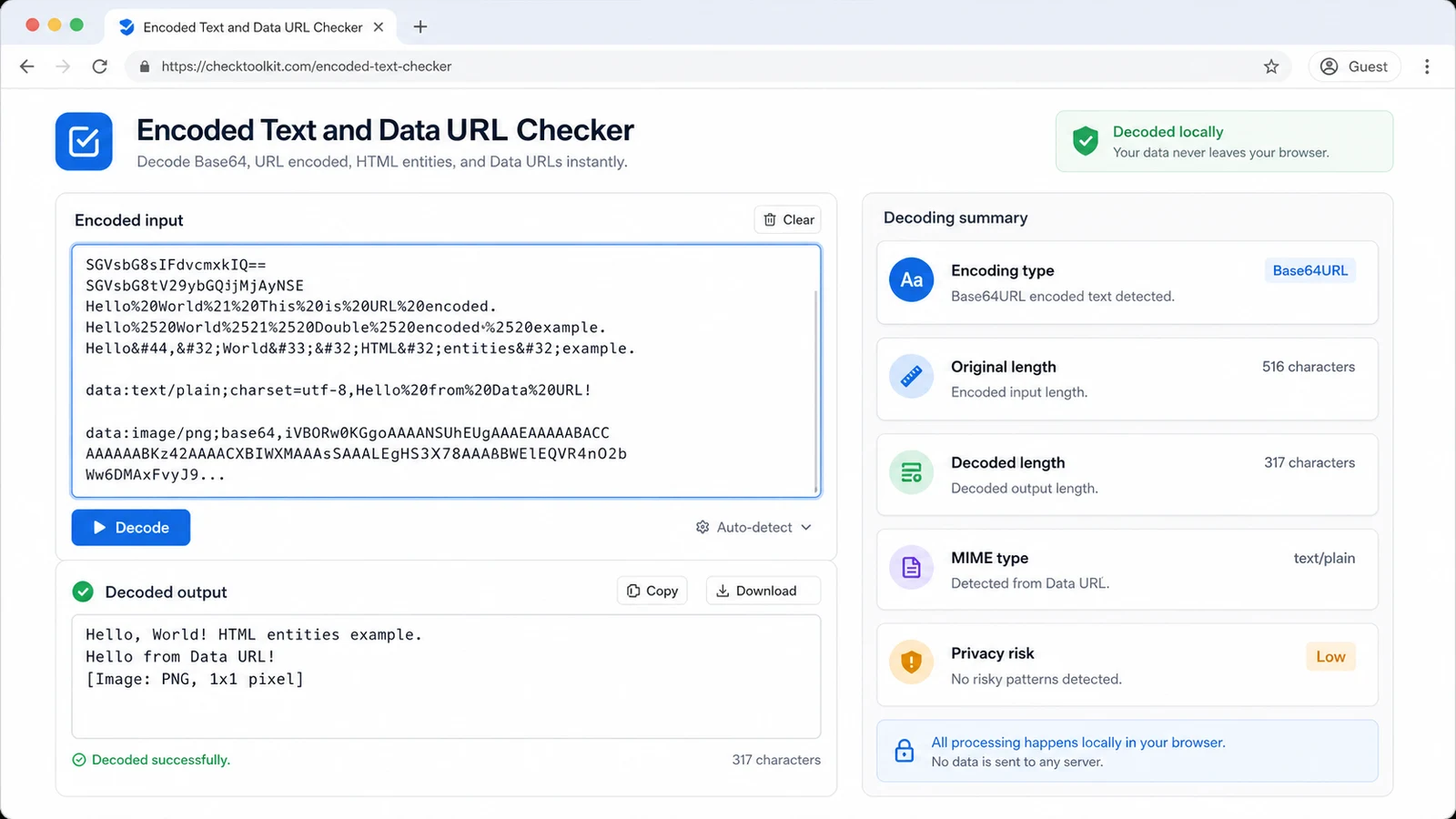
When a Data URL is detected, the report shows MIME type, file type hints for image, font, SVG, JSON, HTML or text content and whether the body was Base64 encoded.
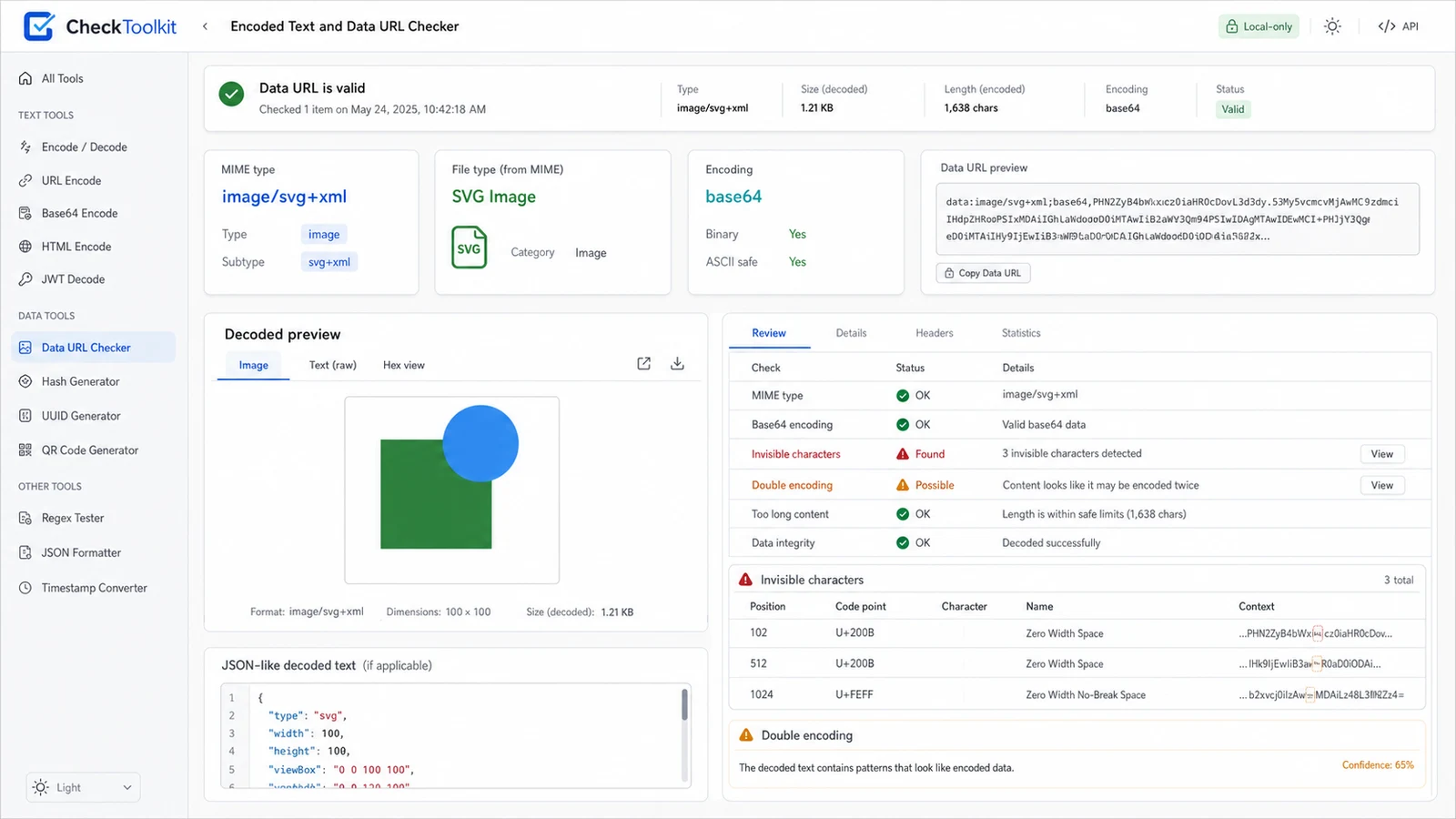
Use the decoded preview and cleaned copy when hidden characters, extra controls or privacy-risk fields need to be removed before sharing the snippet.
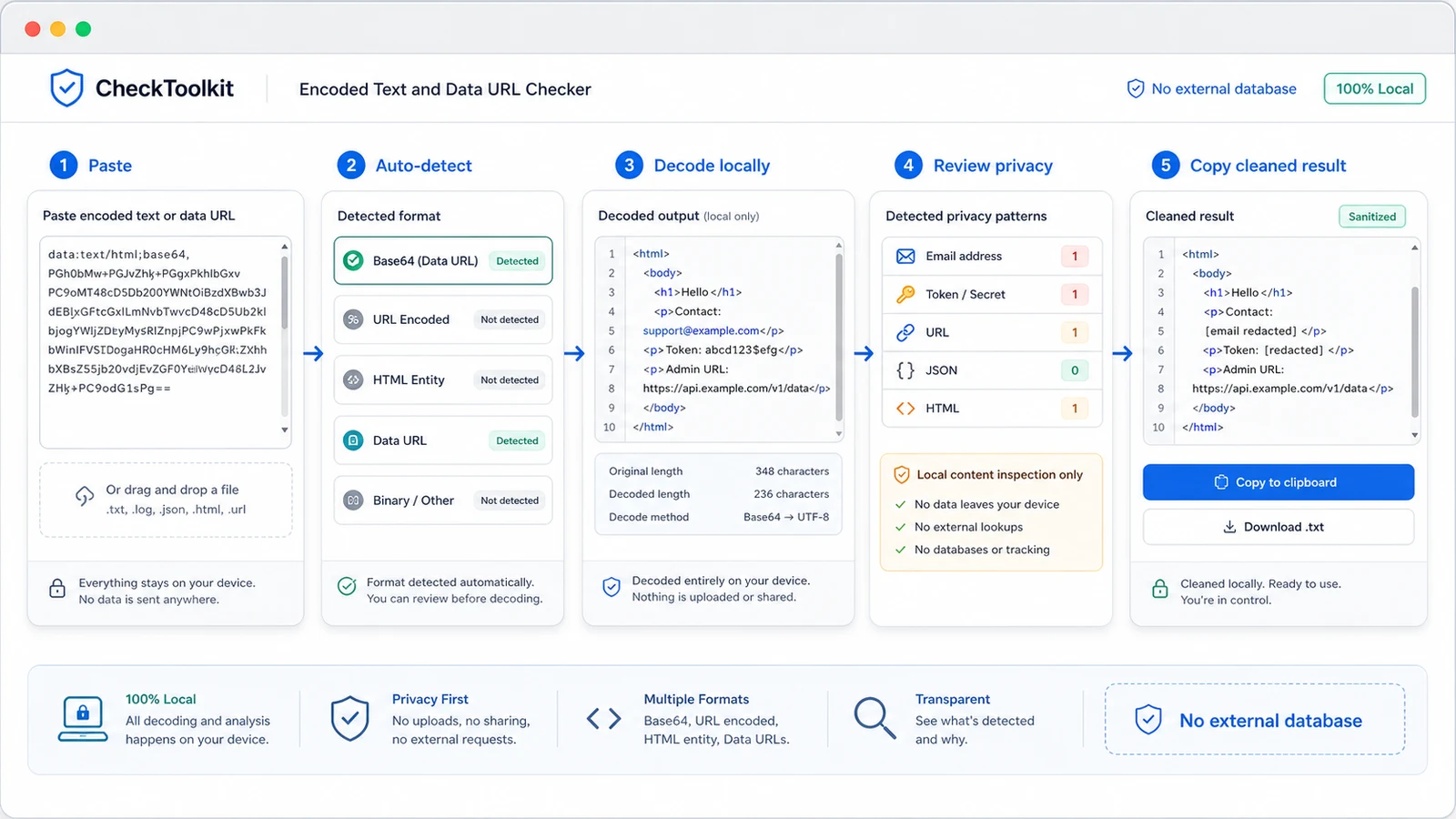
Use this local decoder when unreadable text appears in browser tools, copied emails, API responses, CMS fields, CSS files, SVG assets or issue reports.
The tool recognizes common Base64 and Base64URL shapes, pads them safely for browser decoding and shows the decoded UTF-8 result.
Percent escapes, plus-sign spaces and HTML entities are decoded locally so copied fragments become readable without leaving the page.
Data URLs are parsed for MIME type, file type hints, SVG, image, font, JSON, HTML and text cases, plus Base64 body detection.
The report flags zero-width marks, byte-order marks and control characters that can make copied text behave differently from what you see.
If the decoded result still looks encoded, the checker highlights the next likely type so you can decide whether another decode pass is appropriate.
The tool flags email, token, secret, URL, JSON and HTML-like results while clearly avoiding external malicious URL or file reputation checks.
This is a local decoding preflight for developers, support teams, editors and anyone who receives encoded text they need to understand before sharing.
Use the original Base64, Base64URL, URL encoded text, HTML entity string, Data URL or copied API fragment. Keeping the exact source helps the report detect length, hidden characters and double encoding.
Review all candidate types, not only the first result. Some strings can match more than one shape, especially short Base64-like text or URL encoded text that contains HTML entities.
For Data URLs, check MIME type and inferred file type before assuming the decoded body is plain text.
Review detected typesThe cleaned copy removes invisible and control characters from the decoded result, but it does not prove that links, files or scripts are safe. Redact private values before sharing.
Answers about local decoding, accepted text, accuracy, Data URLs, invisible characters, privacy warnings and security boundaries.
No. Decoding and pattern checks run in your browser tab. The page does not upload the pasted text, store it on a server or query an external safety database.
You can paste Base64, Base64URL, URL encoded text, HTML entities, Data URLs, image Data URIs, font Data URIs, SVG Data URIs, JSON-like encoded text, copied mojibake and API response fragments.
No. It does not perform malicious URL checking, phishing checks, virus scans, file reputation checks or external link safety scoring because those require external databases, security intelligence APIs or real network access.
Some strings can be ambiguous. A short compact value may look Base64-like, and a decoded URL encoded string may still contain HTML entities. The candidates help you choose the result that matches the source context.
The cleaned result removes common invisible and control characters from the decoded text. It does not rewrite URLs, sanitize HTML, verify secrets or remove every private value automatically.
Check that the copied text is complete, includes the Data URL prefix when needed, has not lost padding characters and was not wrapped with extra quotes. If it still fails, the format may not be one of the local reversible encodings this checker supports.
Paste unreadable encoded text when you need one local page for Base64, Base64URL, URL decoding, HTML entities, Data URLs and invisible characters.
Review decoded content, MIME type, double encoding and privacy hints, then copy the cleaned result only after you understand what it contains.
Encoded text is decoded locally in your browser.