Selectable text check
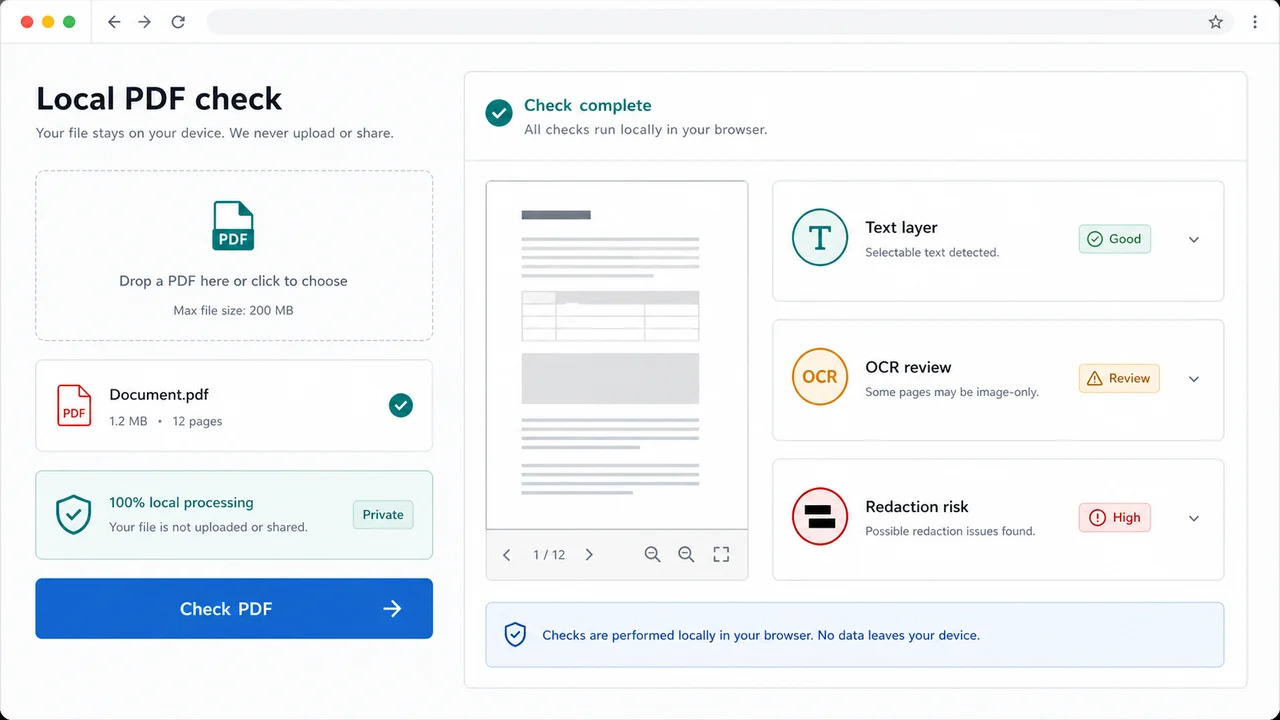
The browser extracts text and summarizes whether the document has a usable text layer.
Local browser PDF inspection
PDF is checked locally in your browser. Your file is not uploaded. Use the PDF Text Layer and Redaction Checker before sharing a contract, court packet, application PDF, invoice or client document to review selectable text, image-only pages, low text coverage, black boxes over copyable text, annotations, forms, attachments, hidden text and page rotation.
Browser-only PDF check
Drop in one PDF and this checker parses it locally with PDF.js. It checks text extraction, likely scan pages, black rectangle overlays, annotation layers, form fields, embedded attachments, suspicious hidden text and rotated pages without uploading the file.
PDF is checked locally in your browser. Your file is not uploaded.
PDF text-layer and redaction results will appear here
Upload a PDF or try a sample to see text layer status, OCR likelihood, scanned-page risk, copyable text, fake redaction warnings, annotations, forms, attachments, abnormal pages, issues and repair suggestions.
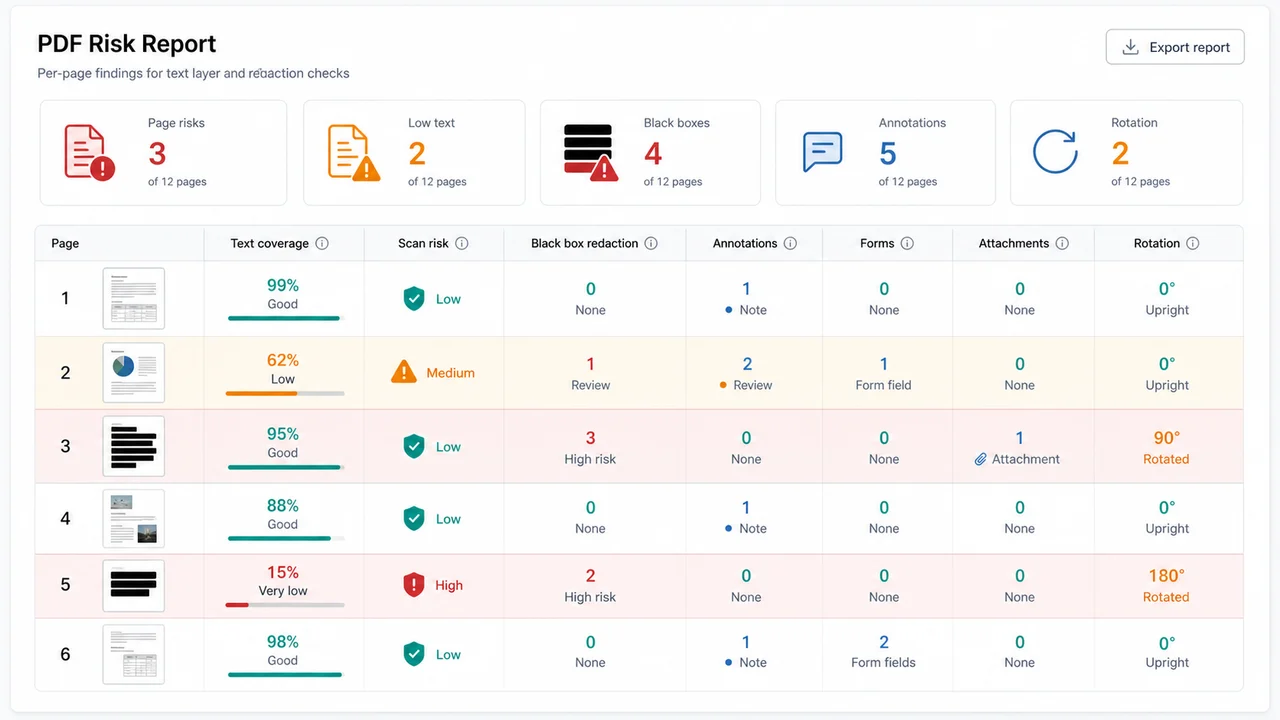
| Page | Text coverage | Scan risk | Redaction risk | Annotation layer risk | Form field risk | Rotation |
|---|
This page combines text-layer, scanned PDF, redaction and hidden-text checks in one local browser report.
Start with one PDF. The browser reads selectable text, page objects and layer clues locally, then highlights the risks that need human review.
Review per-page text coverage, scanned-page risk, black rectangle overlap, annotation layers, forms, attachments and rotation in the report.
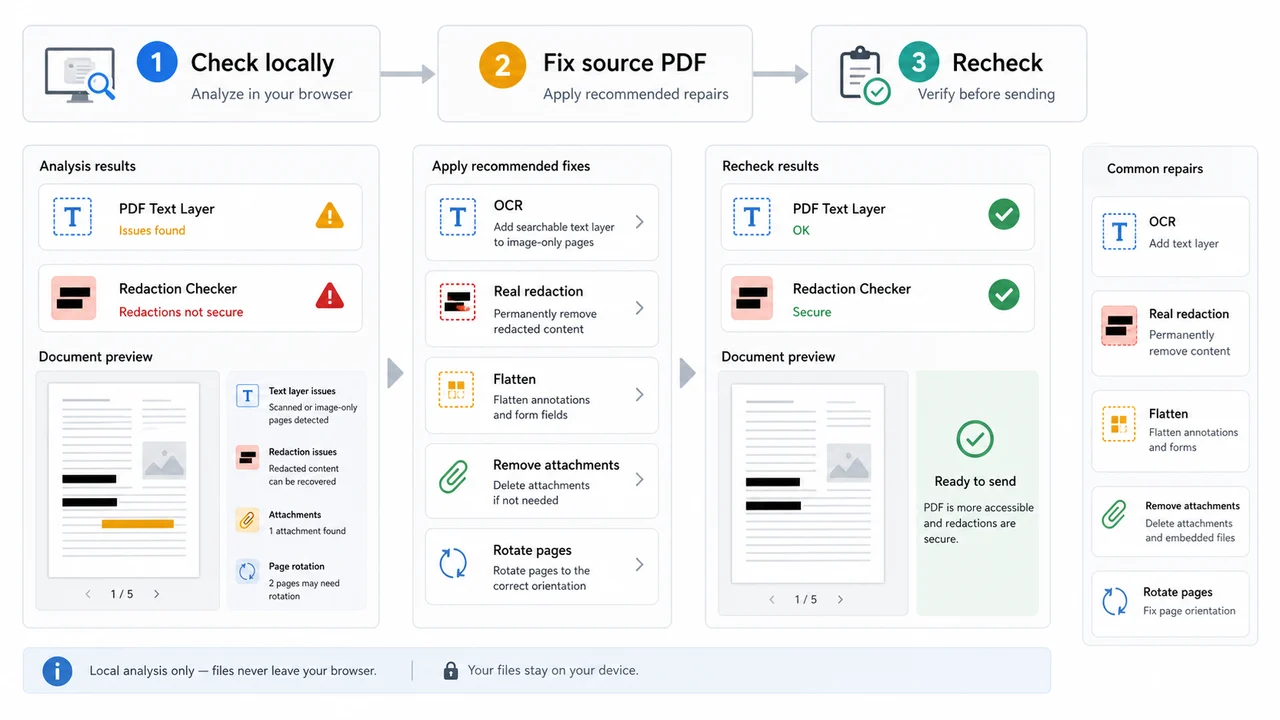
Use the suggestions to run OCR, apply real redaction, flatten annotations, remove attachments or rotate pages, then recheck the final PDF.
Use this local PDF report when a document looks fine on screen but may still contain copyable text, image-only pages, loose annotations or hidden objects.
The browser extracts text and summarizes whether the document has a usable text layer.
Low text coverage plus image-heavy pages are flagged as possible scans that may need OCR.
Black filled rectangles that overlap selectable text are called out as possible fake redactions.
Comments, highlights, stamps and drawings can remain as a layer, so the report separates annotation risk from text risk.
The report shows form-field indicators and embedded attachments that may need flattening or removal.
Rotated pages, hidden text patterns and low-coverage pages are grouped into an abnormal page list for faster repair.
This browser-side preflight helps you decide what to inspect in a PDF editor, but it does not certify legal, accessibility or privacy compliance.
Use this page on the exact file you plan to send. The tool parses the PDF locally and does not upload the document.
Read the text-layer status, OCR likelihood, scanned-page risk, copyable text summary and fake redaction warnings. Black boxes over selectable text should be fixed with real redaction, not drawing shapes.
The checker also reports annotations, form fields, attachments, hidden text patterns and page rotation so you can decide what to flatten, remove or re-export.
Review risksApply OCR only when needed, use permanent redaction for sensitive content, flatten annotations and forms when appropriate, remove unintended attachments and recheck the final PDF.
This is not a PDF Page Size Checker and it is not a metadata-first audit. Use the existing PDF Page Size Checker for page dimensions and the File Privacy and Metadata Checker for metadata review.
Recheck PDFAnswers about privacy, accuracy, OCR limits, fake redactions, annotations, metadata, accessibility claims and what this checker does not do.
No. The PDF is checked locally in your browser and your file is not uploaded. The tool uses browser-side PDF parsing to create the report.
No. The checker can flag pages that look image-heavy or have very low selectable text, but it does not run cloud OCR or create a searchable PDF. Use a trusted OCR tool when the report suggests it.
It looks for black filled rectangles that overlap selectable text boxes. That is a useful warning for fake black-box redactions, but sensitive redaction still needs a proper PDF redaction workflow and human review.
No. This page focuses on text layers, scan risk, redaction overlays, hidden text patterns, annotations, forms, attachments and rotation. Use the existing File Privacy and Metadata Checker for a metadata-first review.
No. This tool deliberately does not duplicate the PDF Page Size Checker. Use the existing PDF Page Size Checker for A4, Letter, Legal, A5, mixed page sizes and print-size review.
No. This checker can help find text extraction and layer risks, but it does not certify WCAG, PDF/UA, Section 508 or any official accessibility requirement.
Use this checker to catch missing selectable text, likely scan pages, fake black-box redactions, annotations, forms, attachments, hidden text patterns and rotation issues locally.
It does not do AI content recognition, sensitive information auditing or cloud OCR. It gives a practical browser-side report so you can fix the final PDF with the right tool.
Free PDF Text Layer and Redaction Checker for local PDF text layer, scanned-page, redaction and hidden-text review.